


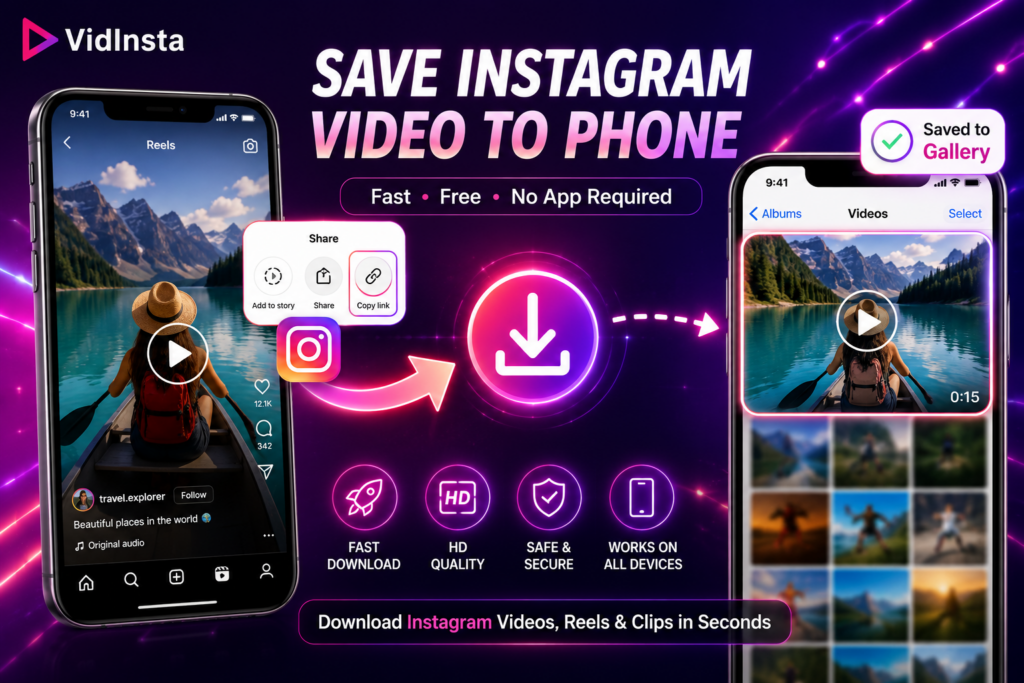
Have you ever found an Instagram video that you were sure you’d come back to later? Maybe it was a recipe you wanted to try on the weekend. Maybe it was a workout routine worth following, a travel Reel that inspired your next trip, or a tutorial that could save you time in the future. Like most people, you probably tapped the Save button and assumed it would always be there when you needed it. Then reality happened. A few days later, the video was buried under hundreds of other saved posts. Sometimes the creator deleted it. Sometimes you simply forgot where it was. And suddenly that video you wanted to keep was gone.
That’s why so many people search for ways to save Instagram video to phone instead of relying on Instagram’s built-in bookmark feature. Having the actual file on your device is very different from saving a post inside the app. A downloaded video can be watched offline, organized into folders, shared across devices, and accessed whenever you need it. While researching this guide, I tested several methods on both Android and iPhone, including Instagram’s built-in download options, screen recording, and browser-based downloaders. Some methods were surprisingly limited, while others worked in just a few seconds. If your goal is simply to save Instagram videos without unnecessary steps, here’s what works best.
Why People Want to Save Instagram Videos
Instagram is designed to keep content inside the app. That works fine until you find something genuinely useful and want to keep it for future reference. One of the biggest reasons people download Instagram videos is convenience. Watching a saved post inside Instagram requires an internet connection and a bit of searching through your collections. A downloaded file, on the other hand, sits directly on your device and is available whenever you want it. Another reason is that Instagram content isn’t permanent. Creators delete posts, accounts become private, and videos sometimes disappear without warning. If there’s content you truly value, downloading it gives you a personal copy that won’t vanish unexpectedly. Many users specifically choose to save Instagram video to phone before traveling or commuting. Instead of relying on a stable internet connection, they can simply open the video from their gallery and watch it instantly.
Can You Save Instagram Videos Directly From Instagram?
The answer is yes, but only in certain situations. Instagram has gradually introduced download options for some Reels. If a creator allows downloads, you may see a Download button when sharing the video. In those cases, saving the video is straightforward and doesn’t require any additional tools. However, this feature isn’t available for every type of content. Many videos don’t include a download option at all, and some creators choose to disable downloads entirely. Traditional feed videos can also be more restrictive than Reels. This limitation is exactly why online Instagram video downloaders have become so popular. They provide a simple alternative when Instagram’s built-in features fall short and make it easier to save Instagram video to phone in just a few seconds.
How to Save Instagram Video Using VidInsta
After testing multiple approaches, browser-based downloading was consistently the fastest and easiest method. Among the tools I tried, VidInsta required the fewest steps and worked smoothly across different devices.
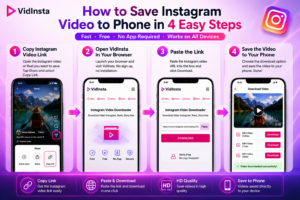
Step 1: Copy the Instagram Video Link
Open the Instagram video or Reel you want to save. Tap the Share button and select Copy Link. Instagram will automatically copy the video’s URL to your clipboard.
Step 2: Open VidInsta in Your Browser
Launch your preferred browser and visit VidInsta. One thing that immediately stands out is the simplicity of the interface. There are no complicated menus, no account registration requirements, and no software installation prompts.
Step 3: Paste the Link
Paste the Instagram URL into the download box and click the Download button. Within a few seconds, the video information should appear on the screen.
Step 4: Save the Video
Choose the available download option and save Instagram video to phone directly from your browser. The file will be stored locally, allowing you to watch it anytime without opening Instagram. In my testing, the entire process typically took less than ten seconds from start to finish. More importantly, it worked the same way on iPhone, Android, Windows, and Mac, making it one of the most convenient solutions for everyday users.
Alternative Ways to Save Instagram Videos
While browser-based downloading is often the easiest option, it’s not the only method available.
Using Instagram’s Built-In Download Feature
If the creator has enabled downloads, this is the most direct solution. Simply tap Share and look for the Download option. Unfortunately, availability varies depending on the content and account settings.
Using Screen Recording
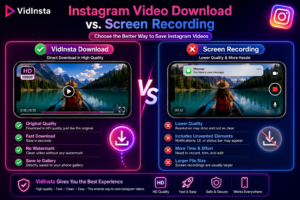
Screen recording can be useful when other methods aren’t available. Both iPhone and Android devices include built-in screen recording features that allow you to capture video playback directly from your screen. The downside is quality. Screen recordings may include notifications, playback controls, or interface elements that wouldn’t appear in the original file. Depending on your device settings, the final result may also be less sharp than the source video. For that reason, screen recording is usually best viewed as a backup method rather than a primary solution if you want to save Instagram video to phone while maintaining the best possible quality.
Is It Safe to Download Instagram Videos?

Safety is one of the most common concerns when using any online downloader. A trustworthy Instagram video downloader should never require your Instagram username or password. Downloading a public video only requires the video link itself. If a tool asks for account credentials, that’s generally a warning sign and should be avoided. It’s also a good idea to use browser-based tools that operate over secure HTTPS connections and don’t require additional software installations. The fewer permissions you grant, the safer the process tends to be. As with any online service, it’s important to respect copyright and creator rights. Download videos for personal use, reference, or offline viewing, and always obtain permission before redistributing someone else’s content.
Frequently Asked Questions
How do I save Instagram videos to my phone?
The easiest method is to copy the Instagram video link, open a browser-based downloader such as VidInsta, paste the URL, and save Instagram video to phone in just a few clicks.
Can I save Instagram Reels on iPhone?
Yes. You can use Instagram’s built-in download option when available or use a browser-based downloader to save Instagram video to phone directly from your iPhone.
Can I download Instagram videos without installing an app?
Absolutely. Modern browser-based tools allow you to save Instagram videos without downloading additional software.
Will the downloaded video keep its quality?
In most cases, yes. The final quality depends on the original video uploaded to Instagram, but reputable downloaders generally preserve the available resolution.
Can I save videos from private Instagram accounts?
No. Private content remains protected by Instagram’s privacy settings. Download tools generally work only with content that is publicly accessible through a shareable link.
Final Thoughts
Finding great content on Instagram is easy. Keeping it is often the difficult part. The platform offers limited download functionality, and saved collections can quickly become crowded with content you’ll struggle to find later. That’s why many users prefer to save Instagram video to phone instead of relying solely on Instagram’s bookmark feature. Whether you’re keeping a tutorial, a travel Reel, a recipe, or a memorable clip you’d like to revisit, having a local copy gives you more control and long-term access. If Instagram’s built-in download option isn’t available, browser-based tools such as VidInsta provide a simple way to download Instagram videos in seconds without installing an app or creating an account. Sometimes the easiest way to avoid losing a great video is simply to save it before it disappears.
